Mark II
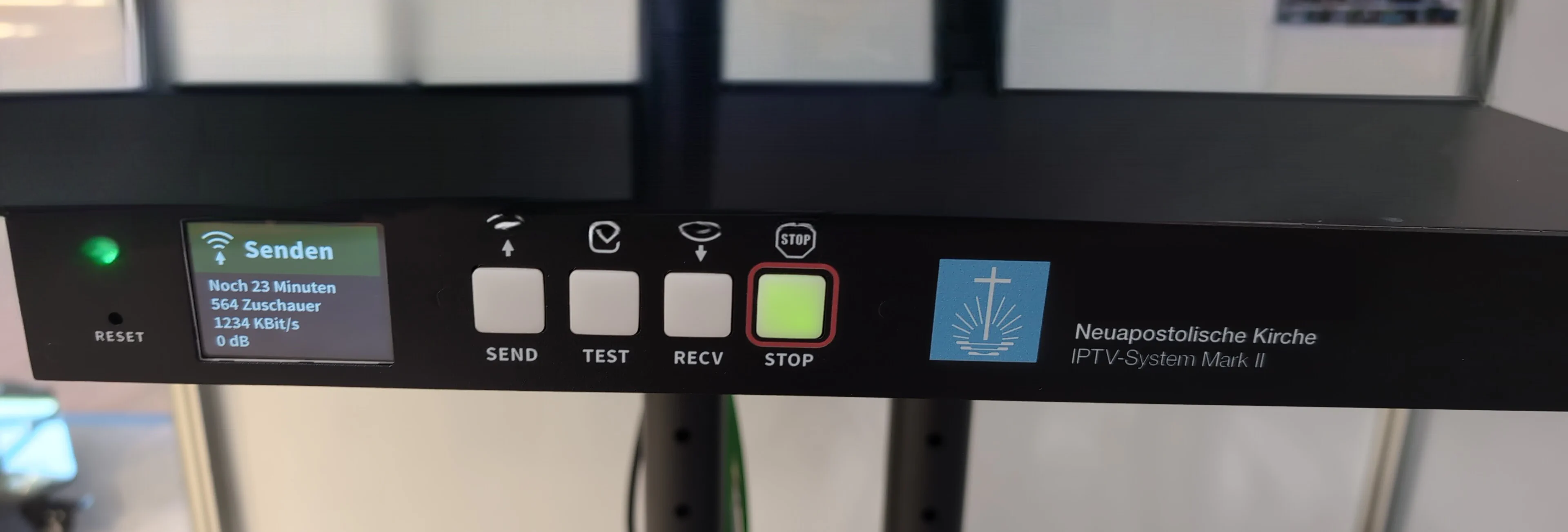
Mark II - Raspberry PI im 19" Gehäuse
(+1) bedeutet, dass für jeweils eine weitere Einheit Platz/Bohrungen vorgesehen sind diese aber nicht direkt verbaut werden
Front
- LCD oder OLED Bildschirm mit 2 – 3“ Diagonale
- 3 Taster (LED Beleuchtet)
- 1 Joystick Taster (5 buttons) oder drehkreuz + 1 button
- (+1) USB 3.0 (Typ A Buchse) (bei verbautem USB3)
Rückseite
- (+1) USB 3.0 (Typ A Buchse) (bei verbautem USB3)
- 1 oder 2 USB 2.0 (Typ A Buchse)
- 1x RJ45 / Gigabit Ethernet
- Audio
- Line OUT an XLR 3 pin (ggf. „Phönix-Kontaktterminal“)
- Line IN an XLR 3 pi (ggf. „Phönix-Kontaktterminal“)
- Video
- SDI-In
- 1 SDI-Out
- (+1) HDMI-In
- 1 BNC Analog-Out (entfernbar als Variante zu HDMIOut1)
- 1 (+1) HDMI-Out (HDMIOut2 fest - HDMIOut1 als variante)
- 0-30V AC/DC Schalteingang als „Schalterkennung“
- Spannungsversorgung
Innen
- Raspberry PI 4
- Termische Verbindung zum Gehäuse zwecks Kühlung
- 4B 4GB Model
- Oder CM4 4G, 16GB eMMC, noWifi
- Oder Standard Baseboard
- USB Soundkarte / HifiBerry hat
- 1(+1) Auvidea B101 (bzw clon)
- 1 * HDMI to AV Converter
- 1 Blackmagic Micro Converter BiDirectional SDI/HDMI 3G
- HDMISplitter (2-to-1)
- HDMI to AV Converter (removed if HDMIOut1 is used)
Verbindungen
graph TD
style SDIIn fill:#ff6347
style HDMIIn2 fill:#ff6347,stroke-dasharray: 5,5
style XLR_IN fill:#ff6347
style HDMI2CSI_Optional stroke-dasharray: 5,5
style Schalterkennung fill:#ff6347
style XLR_Out fill:#ffa500
style SDIOut1t fill:#ffa500
style AnalogOut fill:#ffa500
style HDMIOut fill:#ffa500,stroke-dasharray: 5,5
style HDMIOut2 fill:#ffa500
style USB2 fill:#ffa500
style USB3 fill:#ffa500
SDIIn --> SDIBiDirectionalConvert
HDMIIn2 -.-> HDMI2CSI_Optional
HDMI2CSI_Optional -.-> PI
HDMI2CSI --> PI
PI --> HDMISplitter
PI --> HDMIOut2
PI --> Display
PI --> USB2
PI --> USB3
HDMISplitter --> SDIBiDirectionalConvert
HDMISplitter --> HDMIAVConvert
HDMISplitter -.-> HDMIOut
SDIBiDirectionalConvert --> HDMI2CSI
SDIBiDirectionalConvert --> SDIOut1t
SoundCard --> PI
SoundCard --> XLR_Out
XLR_IN --> SoundCard
HDMIAVConvert --> AnalogOut
Button --> PI
Schalterkennung --> PI
classDef red fill:#ff6347
classDef orange fill:#ffa500
classDef dashed stroke-dasharray: 5,5
class SDIIn,HDMIIn2,XLR_IN,Schalterkennung red
class XLR_Out,SDIOut1t,AnalogOut,HDMIOut,HDMIOut2,USB2,USB3 orange
class HDMIIn2,HDMIOut,HDMI2CSI_Optional dashed
Rote Knoten stellen Eingänge dar, orangefarbene Knoten stellen Ausgänge dar, und gestrichelte Linien repräsentieren optionale Verbindungen.